Updated: June 30, 2026
TL;DR
- A Binance referral code can "not work" for eight distinct reasons — most people confuse these and give up on a code that would have worked.
- The most common cause is a 0% rebate code, which technically works but gives you no discount.
- A code that was never entered at registration cannot be added later — this is a permanent fix problem.
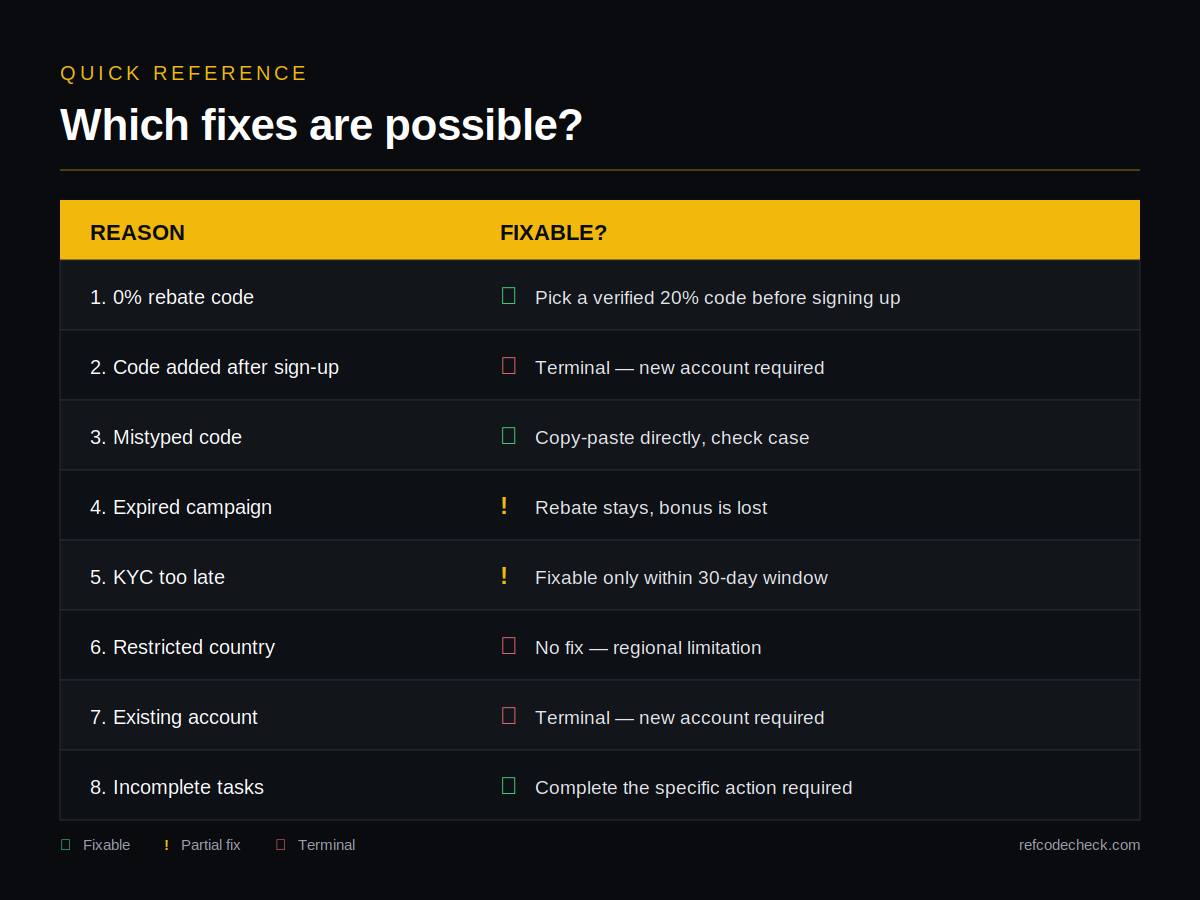
- Fixes exist for six out of the eight reasons. Two are terminal and require a new account.
- Always verify a code on Binance Code Check before signing up to avoid these problems in the first place.
What "not working" actually means
Before troubleshooting, be clear about what failed. "My Binance referral code isn't working" usually means one of three very different things:
- The code was rejected at sign-up — Binance returned an error like "Invalid Referral ID."
- The code was accepted but no discount is showing — the account is created, but trading fees look full.
- The bonus tasks never appeared — the Rewards Hub is empty or shows the wrong offer.
Each of these has different causes. Read the reason list below and match the symptom to your case.
Reason 1: The code shows 0% rebate
Symptom: The sign-up page accepts the code, but the "Trade Rebates" line reads 0% or is missing entirely.
Why it happens: The code is real, but its owner chose not to share any fee discount. The account will register, but you get no ongoing savings — you'll pay Binance's full standard trading fee forever.
Fix: Before you complete registration, close the tab and pick a verified 20% rebate code from a source like Binance Code Check. Codes there are sorted by real rebate rate so you can grab a confirmed 20% one.
Reason 2: You entered the code after signing up
Symptom: You created your Binance account, then tried to add a referral code from your profile settings — and there's no option to do so.
Why it happens: Binance permanently locks the referral field at registration. There is no interface, support ticket, or workaround to add a code afterward.
Fix: This is one of the two terminal cases. Options:
- Continue with the current account and pay standard fees, or
- If your jurisdiction allows multiple accounts, create a new one using a verified code from scratch (check Binance's terms for your region first).
Reason 3: The code was mistyped
Symptom: "Invalid Referral ID" error at sign-up.
Why it happens: Referral codes are case-sensitive and often contain characters that look alike — `0` (zero) vs `O` (letter), `1` vs `l` vs `I`. A single wrong character rejects the code.
Fix:
- Copy the code directly from the source, don't retype it
- Check for leading or trailing spaces after paste
- Confirm case — `CODE20` and `code20` are treated differently
- If clicking a referral link, make sure the "Referral ID" field on the sign-up form auto-filled — sometimes the field is collapsed under "Advanced options"
Reason 4: The bonus campaign expired
Symptom: The code registers your account and gives you the fee discount, but the promised new user bonus (like $19,800) never appears in the Rewards Hub.
Why it happens: The rebate rate and the bonus campaign are two separate things. Binance regularly ends and restarts bonus campaigns while the code itself stays live. An old blog post promising "$100 bonus" may point to a campaign that ended months ago.
Fix:
- Check the current Binance sign-up page for that code — it will show only active campaigns
- Verify recent bonus amounts on Binance Code Check rather than trusting outdated articles
- If you already signed up, the fee discount still applies — only the expired bonus is lost
Reason 5: You did not complete KYC in time
Symptom: Bonus tasks appeared in the Rewards Hub but are now locked or say "Ineligible."
Why it happens: Most Binance welcome bonuses require KYC verification within 30 days of registration. If you signed up and put off identity verification, the bonus window closed.
Fix:
- If the 30-day window is not yet closed: complete KYC immediately and the tasks will unlock
- If the window has already passed: the fee rebate discount still works, but the bonus portion is permanently lost for this account
Reason 6: You are in a restricted country
Symptom: The code is rejected at sign-up, or the account creates but the Rewards Hub is empty.
Why it happens: Binance's referral program has geographic restrictions. Users in Singapore, Nigeria, Israel, Hong Kong and several other jurisdictions are excluded from parts or all of the program. In some regions, the global Binance platform is not available at all and users must use a local variant like Binance.US.
Fix:
- Check Binance's terms for your country before signing up
- If you're in the U.S., use Binance.US — but note that referral programs there are much more limited
- Using a VPN to bypass restrictions violates Binance's terms and can result in a permanent account freeze — do not attempt this
Reason 7: You already have a Binance account
Symptom: Registration is rejected with "Account already exists" or the code is silently ignored.
Why it happens: Referral codes only apply to genuinely new accounts. Binance detects existing accounts by email, phone number, ID document, and often device fingerprint. Trying to sign up again with the same identity to "apply" a code will not work.
Fix: There is no fix for this on your existing account (see Reason 2). This is the second terminal case.
Reason 8: The tasks require actions you have not completed
Symptom: You see the bonus tasks in your Rewards Hub but the reward voucher never lands in your account.
Why it happens: Binance welcome bonuses come with specific requirements — usually a minimum deposit, first trade, or specific product usage (spot, futures, convert). Completing KYC alone is not enough; the tasks must be finished within their individual windows.
Fix:
- Go to Rewards Hub → Tasks and read each task's exact requirement
- Common requirements: deposit ≥ $50, first spot trade ≥ $100, first futures trade within 14 days
- Vouchers are usually credited within 24 hours of task completion; wait a day before assuming it failed
- If a voucher is missing after 48 hours despite completing the task, contact Binance chat support — this is one of the few cases where support can actually help
Quick reference: which fixes are possible?
How to avoid all eight problems
The single biggest step: verify the code before you sign up, not after. Once registration is complete, six of these eight problems become expensive or impossible to fix.
A 30-second verification workflow:
1. Look up the code on Binance Code Check and confirm it shows 20% Trade Rebates 2. Click through to the Binance sign-up page and confirm the same "20% Trade Rebates" line appears 3. Note the current bonus amount shown on Binance's page (not a third-party article) 4. Complete registration in one session, then finish KYC within 30 days 5. Complete all listed bonus tasks within their windows
If those five steps happen in order, none of the eight reasons above will apply to you.
Frequently Asked Questions
Can Binance support fix my referral code problem?
Only for Reason 8 (missing voucher despite completed tasks). Support cannot add a code after registration, change your existing code, or reinstate an expired bonus.
Why does my code work but show no discount?
Almost always Reason 1 — the code is genuine but has a 0% rebate rate. Verify the rebate rate on Binance Code Check before assuming a code is broken.
Can I delete my Binance account and re-register with a code?
Technically possible in some regions, but Binance's fraud detection often flags this. Deleting and recreating with the same identity documents can result in a permanent ban. This is not a recommended fix.
Is there a way to check if a code will work before I sign up?
Yes. The Binance sign-up page itself is the source of truth — if it displays "Up to 20% Trade Rebates" after you enter the code, it will work. Binance Code Check automates this so you can compare codes without opening each one manually.
Why do old articles list bonuses that no longer work?
Because bonus campaigns change frequently while codes stay live. An article from 2024 promising "$100 bonus" may point to a code that now offers a completely different reward. Always check the current sign-up page before relying on a bonus figure.
---
Before you sign up, run your code through the checker on refcodecheck.com or browse the verified codes list sorted by rebate rate — five seconds now saves you from six of the eight problems above.